Overview
Readers will learn how to configure a Policy-Based Site-to-Site IPsec VPN on an EdgeRouter.
NOTES & REQUIREMENTS:
Applicable to the latest EdgeOS firmware on all EdgeRouter models. Please see the Related Articles below for more information.
Device used in this article:
Table of Contents
Frequently Asked Questions (FAQ)
|
1. What Site-to-Site IPsec VPN types can be configured on EdgeOS?
|
|
2. What are the available encryption and hashing options for IKE and ESP?
|
Setting up a Policy-Based VPN
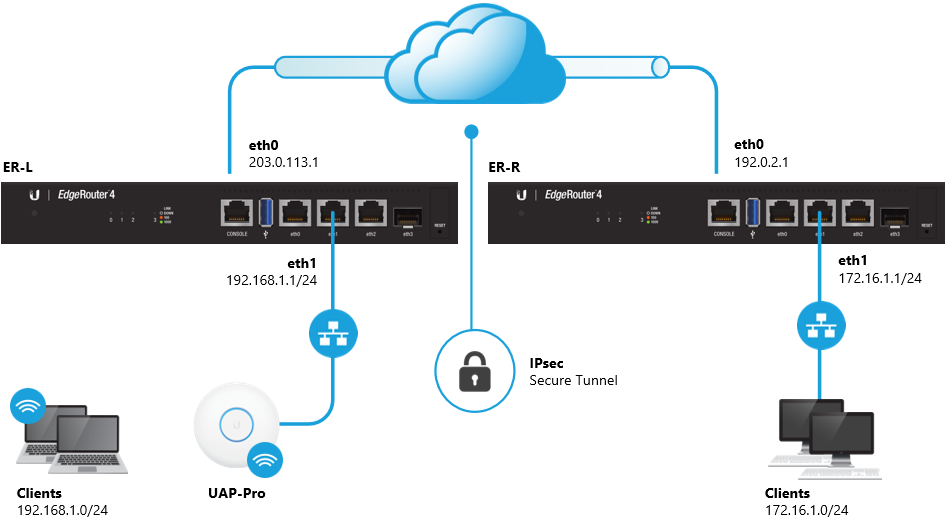
The 192.168.1.0/24 and 172.16.1.0/24 networks will be allowed to communicate with each other over the VPN.
Follow the steps below to configure the Policy-Based Site-to-Site IPsec VPN on both EdgeRouters:
GUI: Access the Web UI on ER-L.
1. Define the IPsec peer and hashing/encryption methods.
VPN > IPsec Site-to-Site > +Add Peer
- Check: Show advanced options
- Check: Automatically open firewall and exclude from NAT
Peer: 192.0.2.1
Description: ipsec
Local IP: 203.0.113.1
Encryption: AES-128
Hash: SHA1
DH Group: 14
Pre-shared Secret: <secret>
Local subnet: 192.168.1.0/24
Remote subnet: 172.16.1.0/24
2. Apply the changes.
GUI: Access the Web UI on ER-R.
1. Define the IPsec peer and the hashing/encryption methods.
VPN > IPsec Site-to-Site > +Add Peer
- Check: Show advanced options
- Check: Automatically open firewall and exclude from NAT
Peer: 203.0.113.1
Description: ipsec
Local IP: 192.0.2.1
Encryption: AES-128
Hash: SHA1
DH Group: 14
Pre-shared Secret: <secret>
Local subnet: 172.16.1.0/24
Remote subnet: 192.168.1.0/24
2. Apply the changes.
NOTE:There is more information on the ‘Automatic Firewall/NAT’ feature in the Modifying the Default IPsec Site-to-Site VPN article.
Related Articles
EdgeRouter – Modifying the Default IPsec Site-to-Site VPN
EdgeRouter – Dynamic Site-to-Site IPsec VPN using FQDNs
EdgeRouter – Route-Based Site-to-Site IPsec VPN
Intro to Networking – How to Establish a Connection Using SSH