EdgeRouter – Site-to-Site IPsec VPN to Cisco ISR
Overview
Readers will learn how to configure a Policy-Based Site-to-Site IPsec VPN between an EdgeRouter and a Cisco ISR.
- EdgeRouter 4 (ER-4)
- Cisco ISR
Table of Contents
FAQ
|
1. What Site-to-Site IPsec VPN types can be configured on EdgeOS?
|
|
2. What are the available encryption and hashing options for IKE and ESP?
|
Setting up a Policy-Based VPN
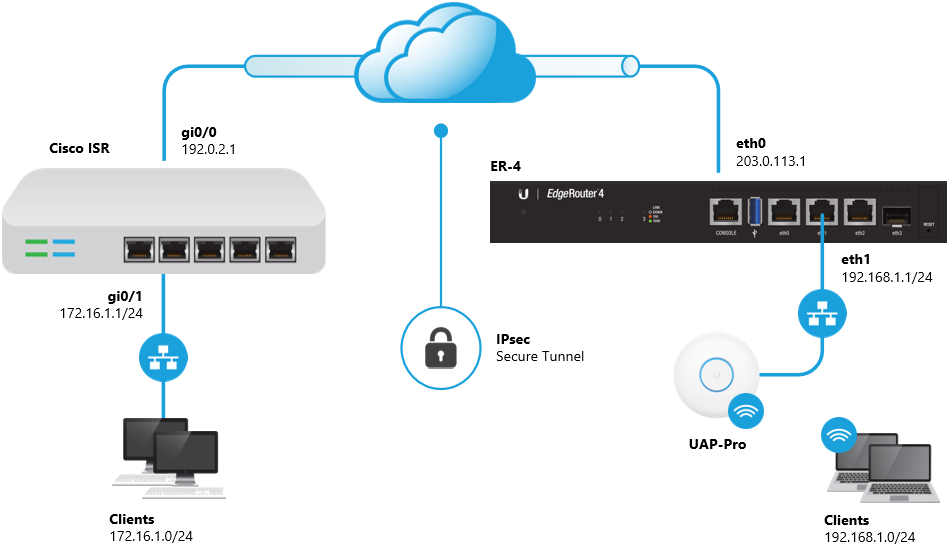
The 192.168.1.0/24 and 172.16.1.0/24 networks will be allowed to communicate with each other over the VPN.
1. Enter configuration mode.
configure
2. Enable the auto-firewall-nat-exclude feature.
set vpn ipsec auto-firewall-nat-exclude enable
3. Create the IKE / Phase 1 (P1) Security Associations (SAs).
set vpn ipsec ike-group FOO0 lifetime 28800
set vpn ipsec ike-group FOO0 proposal 1 dh-group 14
set vpn ipsec ike-group FOO0 proposal 1 encryption aes128
set vpn ipsec ike-group FOO0 proposal 1 hash sha1
4. Create the ESP / Phase 2 (P2) SAs and disable Perfect Forward Secrecy (PFS).
set vpn ipsec esp-group FOO0 lifetime 3600
set vpn ipsec esp-group FOO0 pfs disable
set vpn ipsec esp-group FOO0 proposal 1 encryption aes128
set vpn ipsec esp-group FOO0 proposal 1 hash sha1
5. Define the remote peering address (replace <secret> with your desired passphrase).
set vpn ipsec site-to-site peer 192.0.2.1 authentication mode pre-shared-secret
set vpn ipsec site-to-site peer 192.0.2.1 authentication pre-shared-secret <secret>
set vpn ipsec site-to-site peer 192.0.2.1 description ipsec
set vpn ipsec site-to-site peer 192.0.2.1 local-address 203.0.113.1
6. Link the SAs created above to the remote peer and define the local and remote subnets.
set vpn ipsec site-to-site peer 192.0.2.1 ike-group FOO0
set vpn ipsec site-to-site peer 192.0.2.1 tunnel 1 esp-group FOO0
set vpn ipsec site-to-site peer 192.0.2.1 tunnel 1 local prefix 192.168.1.0/24
set vpn ipsec site-to-site peer 192.0.2.1 tunnel 1 remote prefix 172.16.1.0/24
7. Commit the changes and save the configuration.
commit ; save
1. Enter configuration mode.
configure terminal
2. Create an IKE policy.
crypto isakmp policy 100
 authentication pre-share
 encryption aes 128
 hash sha
 group 14
 lifetime 28800
3. Configure a Transform Set for IPsec.
crypto ipsec transform-set ipsec-ts esp-aes 128 esp-sha-hmac
4. Define the peer address (replace <secret> with your desired passphrase).
crypto isakmp key <secret> address 203.0.113.1
5. Create an Access List that defines the remote and local subnets.
ip access-list extended ipsec-acl
 permit ip 172.16.1.0 0.0.0.255 192.168.1.0 0.0.0.255
6. Create a crypto map and link it to the previously created transform-set and access-list.
crypto map ipsec-cm 100 ipsec-isakmp
 set peer 203.0.113.1
 set transform-set ipsec-ts
 match address ipsec-acl
 set security-association lifetime seconds 3600
7. Assign the crypto map to the WAN interface.
interface gi0/0
 crypto map ipsec-cm
8. Exclude the IPsec traffic from being translated by NAT.
ip access-list extended nat-acl
 deny ip 172.16.1.0 0.0.0.255 192.168.1.0 0.0.0.255
 permit ip 172.16.1.0 0.0.0.255 any

ip nat inside source list nat-acl interface gi0/0 overload
9. Write the changes to the startup configuration.
copy running-config startup-config
Related Articles
EdgeRouter – Site-to-Site IPsec VPN to Cisco ASA
EdgeRouter – Policy-Based Site-to-Site IPsec VPN
Intro to Networking – How to Establish a Connection Using SSH